This piece has two parts. Part One lays out a full defense-in-depth model for hardening a production VPS, layer by layer, with the specific mechanics, common failure points, and an ordered starting point depending on your threat model. Part Two is the honest follow-up: a look at what current security research still hasn't proven about that kind of model, and where a working team should be testing its own assumptions rather than trusting the checklist blindly.
Part One: The Model
Every year, thousands of production workloads are provisioned on a VPS with little more than a root password and an SSH key. The instance boots, the application deploys, the demo works: and the box quietly stays in that state for months, sometimes years, until someone finds it during an assessment or, worse, an incident.
The problem is rarely a single missing control. It's the absence of a model. Teams reach for checklists: "disable root login," "enable a firewall," "set up fail2ban": without a structure that tells them which layer each control belongs to, or what happens when one layer fails. Checklists get outdated. Models don't.
This article lays out VPS hardening using defense-in-depth: the principle that no single control should be a system's only line of defense.
The model has two parts. Five layers sit in sequence along the actual breach chain: each one assumes the previous was bypassed:
- Perimeter: what can reach the box, and what it can reach out to
- Host: the operating system itself
- Access: who can authenticate, and how
- Application: what runs on top of the OS
- Observability: how you know something went wrong, and how fast
Three more sit outside that chain entirely: they're not steps an attacker passes through, they're conditions that determine whether the five layers above mean anything at all:
- Lifecycle: how the box comes to exist and how it's retired
- Provider Control Plane: the layer above the OS that can bypass every one of the five
- Backup and Recovery: what happens after a breach, regardless of which layer failed
Treat this as an architecture to reason from, not a script to run once and forget.
Know the Adversary Before You Spend the Hour
Not every VPS faces the same attacker, and pretending otherwise leads to misallocated effort. Two threat profiles cover most production boxes:
- Commodity, automated attackers. Mass internet-wide scanners probing for exposed ports, default credentials, and known CVEs in unpatched software. This is constant background noise on any public IP and is largely defeated by the basics: patching, a default-deny firewall, no exposed admin interfaces, disabled password auth.
- Targeted, human operators. Someone specifically interested in your infrastructure, your clients, or your data. They will pivot through misconfigurations, abuse legitimate access (including the provider's control plane, not just SSH), and wait quietly once inside. Defeating this profile requires the deeper layers below: access discipline, egress control, and real observability.
A concrete prioritization for each profile closes this article. For now, the point is simpler: these two adversaries justify different spending, and a model that weighs every control equally is answering a question nobody asked.
Before the Box Exists: Lifecycle
Hardening a running instance is where most articles start. It's also where most drift begins, because a box that's manually hardened once and never touched again is a box that's slowly un-hardening itself.
- Base image provenance. Build from a known, minimal, officially maintained image. Don't inherit a "golden image" nobody can account for.
- Provision declaratively. Use
cloud-initfor first-boot configuration and a config management tool (Ansible, Terraform, Salt) or an immutable image pipeline (Packer) so the box's configuration is defined in version control, not accumulated by hand over SSH sessions. This is the actual fix for "the box quietly stays in that state for months": drift is a lifecycle problem, not a one-time hardening problem. It also determines whether incident response can ever mean "rebuild" rather than "clean," which matters later. - Decommission deliberately. When a box is retired: revoke its credentials and keys, delete orphaned snapshots and volumes (a stale snapshot of a compromised disk is a live liability sitting in your provider account), and remove its DNS records. A dangling DNS record pointing at a released IP or an unclaimed cloud resource is a straightforward subdomain takeover for whoever claims that resource next.
Layer 1: Perimeter, Controlling What's Reachable in Both Directions
The first question for any production VPS isn't "how do I secure this service," it's "does this service need to be reachable from the internet at all": and, less commonly asked, "does this box need to reach out to the internet freely."
Minimize inbound exposure, and don't forget IPv6.
- Use a host-based firewall (
ufw,nftables) with a default-deny inbound policy, and mirror that policy in your cloud provider's security groups: the two are not redundant, they cover different failure modes (a misconfiguredufwrule vs. a misconfigured security group). - Bind administrative interfaces (databases, caches, admin panels, metrics endpoints) to
localhostor a private network, never0.0.0.0: and remember that127.0.0.1is not::1. A service bound only to the IPv4 loopback address can still be reachable over IPv6 if the box has a public IPv6 address and the firewall rules weren't written for both address families. Most VPS providers now assign IPv6 by default; check for it, don't assume it isn't there. - Write and verify firewall rules for both IPv4 and IPv6 explicitly:
ufwandnftablesboth require this to be deliberate, not automatic. A default-deny IPv4 policy with no equivalent IPv6 policy is a firewall that's half-configured and looks fully configured. - Route inter-service traffic on a private VPC/internal network rather than the public interface.
Filter outbound by default: with the honest limits of doing it on the host.
A default-deny inbound firewall does nothing to stop a webshell from phoning home or a compromised process from staging an exfil connection. Default-deny outbound, with explicit allow rules for the destinations your application actually needs, turns command-and-control and staged exfiltration from routine into detectable-or-blocked.
But a host-local firewall rule only holds as long as nothing on the host can change it: and root can always change it. This is a general principle, not one specific to egress: any control that lives on the box itself (a firewall rule, auditd, AIDE, fail2ban) is a control an attacker with root can disable, reconfigure, or blind, the same way they can clear a local log. Where the threat model includes a targeted operator who may get root, egress control needs to live somewhere the compromised host can't reach: a NAT gateway, a cloud security group, or a forced upstream proxy the host has no credentials to reconfigure.
Egress filtering also has real operational cost, and pretending otherwise gets it disabled the first time it breaks something:
- It breaks
apt/dnfpackage installs, NTP sync, and ACME certificate renewal (Let's Encrypt) unless those destinations are explicitly allowed: and some of those destinations sit behind rotating CDN IPs, so a hardcoded IP allowlist will break again later. Allow by hostname where your firewall supports it, or maintain the allowlist as a genuine maintenance task, not a one-time entry. - Allowing outbound DNS to any resolver defeats most of the point: DNS-over-anything to an arbitrary resolver is itself a viable exfiltration channel. Restrict outbound DNS to your intended resolver specifically, not "port 53 to anywhere."
Put a real boundary in front of SSH.
- Where the operational model allows it, put SSH behind a VPN or WireGuard tunnel and don't expose port 22 publicly at all.
- Where it must be exposed, restrict source IPs to known ranges (office, VPN, bastion).
- Moving SSH off port 22 reduces scanner log noise; it is a triage aid, not a security control, and shouldn't be counted as one.
Rate-limit and filter at the edge. A WAF, a reverse proxy with rate limiting, or a cloud provider's DDoS protection layer stops a large share of automated attacks before they reach the application.
The perimeter layer's job is not to be perfect in either direction. It's to make sure that when it fails, there's still something behind it: and that a compromise on the inside doesn't get a free path back out.
Layer 2: Host, Hardening the Operating System
Assume the perimeter has been bypassed, or that the attacker has legitimate access to one exposed service. What does the host itself look like from there?
Patch on a real cadence. Set up unattended security upgrades for the OS (unattended-upgrades on Debian/Ubuntu, dnf-automatic on RHEL-family systems), and maintain a separate, deliberate cadence for application dependencies: a lockfile is not a patch policy. Unpatched software is a recurring theme in independent breach research; treat "we'll patch eventually" as a decision with a measurable cost, not a neutral default.
Reduce the host's attack surface directly:
- Remove or disable services you didn't intentionally install.
- Disable unused kernel modules and filesystems where practical.
- Enable
AppArmororSELinuxin enforcing mode: disabling it during setup because it's inconvenient is a shortcut we've seen reversed later at real cost. - Benchmark against a known standard rather than an ad hoc list: the CIS Benchmarks for your specific distribution give you a scored, auditable baseline instead of a list someone remembers from a blog post.
Audit execution, not just files. File integrity monitoring (AIDE, or Wazuh's FIM) tells you a file changed. It doesn't tell you what ran. auditd gives you syscall- and execution-level visibility: who ran what, when, as which user: which is what actually answers "what did the attacker do" rather than just "what did the attacker touch." Remember the principle from Layer 1: auditd and AIDE are host-local controls, and root can disable or tamper with both. They're valuable against everything short of a full root compromise, not a guarantee against one.
Check the persistence surfaces attackers actually use: cron jobs and systemd timers, ld.so.preload, unexpected kernel modules, and new systemd units. These are the mechanisms real persistence uses, and none of them show up in a basic file integrity scan unless you're specifically watching them.
Keep clocks correct. Run NTP. This sounds unrelated to security until an incident, at which point every log you collected across every layer needs to be correlated by timestamp: and it can't be, if the host's clock has drifted.
Kernel-level hardening via sysctl: disable IP forwarding unless the box is explicitly a router, enable SYN flood protection, disable ICMP redirects, and ignore broadcast pings.
Layer 3: Access, Assuming Credentials Get Targeted
SSH access: the details that actually matter, not just the headline settings:
- Disable password authentication (
PasswordAuthentication no) andKbdInteractiveAuthentication no. Disabling only the former leaves keyboard-interactive authentication open on several distributions by default: a gap that defeats the point of "keys only" without anyone noticing. - Restrict who can even attempt to authenticate with
AllowUsersorAllowGroups, and cap attempts withMaxAuthTries. - Constrain
authorized_keysentries themselves:from=to restrict source IPs per key,command=to restrict what a key can execute,no-port-forwardingandno-agent-forwardingto stop a compromised key from being used as a pivot. - Don't forward your SSH agent across a jump host: it hands a live authentication capability to every machine in the chain. Use
ProxyJumpinstead, which brokers the connection without exposing your key material to the intermediate host. - On
PermitRootLogin:nois correct for interactive use. If automation genuinely needs root over SSH (rare, and worth questioning),prohibit-passwordis the narrower option: it permits key-only root access without opening the door to root password guessing.
Don't lock yourself out while doing any of this. Every change above is a change to the exact mechanism you're using to make the change. Before restarting sshd:
- Run
sshd -tto validate the config syntax before reloading: a typo insshd_configcombined with a restart is how people get locked out of boxes with no other access path configured. - Keep your current SSH session open and test the new configuration from a second, separate session before closing the first. If the second session fails to connect, the first one is still there to fix it.
- Know your provider's serial or web-based console (separate from SSH) as the actual recovery path if both of the above fail. It's the one access method that doesn't depend on
sshdbeing reachable or correctly configured: which is exactly why the Provider Control Plane section (below) treats that same console as something to secure carefully in the other direction.
Privilege management:
- Application service accounts should never run as root, scoped to exactly the file and network permissions they need.
- Audit
sudoconfiguration regularly. Overly broadNOPASSWDentries are a recurring finding, and they quietly erase the value of every other access control on the box.
Authentication resilience:
fail2banor an equivalent is worth running, but know what it buys you: it's log-parsing that throttles noisy, single-source brute force. It doesn't meaningfully slow a distributed or low-and-slow attempt, it has had its own vulnerabilities disclosed over the years, and: per the Layer 1 principle: it's a host-local control an attacker with root can disable. Treat it as noise reduction, not a defense layer in its own right, the same caveat that applies to moving SSH off port 22.- MFA on anything reachable from outside a trusted network: cloud provider consoles and admin panels included, not just SSH.
Secrets management: no credentials in source code, shell history, or committed environment files. Use a secrets manager or, at minimum, encrypted environment files with restricted permissions.
Layer 4: Application, Containing What Runs on Top
Isolation, with an honest caveat. Running workloads in containers reduces blast radius only under specific conditions: non-root user inside the container, dropped Linux capabilities, no --privileged mode, and no Docker socket mounted in. A default docker run with none of that configured is not meaningfully more contained than running the process directly on the host: stating otherwise is the kind of overstated claim that becomes a finding in someone else's assessment report.
The Docker/ufw interaction, mechanically. Docker manages its own iptables rules independent of ufw. When a container publishes a port (-p 8080:8080), Docker installs a DNAT rule that rewrites the destination and sends that traffic through the FORWARD chain: not INPUT. ufw's policy lives in INPUT. The practical result: ufw can report a default-deny posture, correctly, while a published container port is fully reachable anyway, because the traffic never evaluates against the chain ufw controls. Verify actual exposure with iptables -L -n or nft list ruleset, not ufw status. Fixes, in order of how surgical they are:
- Bind the published port to loopback explicitly:
-p 127.0.0.1:8080:8080: if the port only needs to be reached by another process on the same host or through a reverse proxy. - Use the
DOCKER-USERchain, which Docker provides specifically so operators can insert their own filtering rules ahead of Docker's, without fighting Docker's own rule management. - Set
"iptables": falseindaemon.jsonand manage all filtering yourself, if you want a single source of truth for firewall state: at the cost of manually replicating what Docker was doing automatically for container networking.
The docker group is root-equivalent, not a scoped permission: anyone in it can mount the host filesystem into a container and walk out with root, and mounting the Docker socket (/var/run/docker.sock) into a container is a full host escape by design. The direct fix isn't a permissions tweak: run rootless Docker or use Podman, both of which are built specifically so that "in the container-management group" no longer implies "root on the host."
Dependency hygiene. Pin versions and scan for known vulnerabilities in third-party packages on a schedule. Supply-chain compromise via a dependency is a real and discussed initial-access vector: treat it with the same seriousness as unpatched OS packages.
Minimal runtime images. Remove build tools, compilers, and debugging utilities from production images so a compromised container can't compile an attacker's own tooling on-box.
Standard application security (parameterized queries, output encoding, validated input, the broader OWASP guidance) belongs here too: this is where application security and infrastructure security meet, and neither substitutes for the other.
Layer 5: Observability, Knowing When the Other Layers Failed
Centralized logging. Auth logs, application logs, and web server logs should ship off-box to a location the compromised host cannot itself alter. A local-only log on a compromised machine is not evidence: an attacker with root can and will clear it, for the same reason root can defeat any other host-local control described in Layer 1.
Meaningful alerting. Alert on events that matter: new SSH keys added, sudo privilege changes, unexpected outbound connections (which Layer 1's egress filtering should already be constraining, making violations of it a strong signal), unfamiliar processes binding to network ports, unscheduled reboots. A flood of low-signal alerts trains people to ignore all of them, including the one that matters.
Baseline and detect drift. Know what "normal" looks like for CPU, memory, network egress, and running processes on this specific box, so "abnormal" is something a human or a rule can actually catch.
Have an incident response plan before you need one: and the plan should default to rebuilding, not cleaning. A host that's had root compromised can't be reliably remediated in place: you cannot enumerate every change an attacker with root access might have made, so any "clean the malware and keep the box" approach is a guess dressed up as a fix. The dependable response is to isolate the box for forensics, then destroy it and rebuild from a known-good image and configuration. This is only cheap and fast if Lifecycle's declarative provisioning was actually in place beforehand: a box that was hand-configured over months of SSH sessions turns "destroy and rebuild" into a multi-day scramble instead of a scripted response. Once rebuilt, which backup generation is safe to restore from depends on a dwell-time estimate: how long the attacker actually had access: exactly the kind of question this layer's logging is what makes it answerable at all, as the Backup and Recovery section below covers directly.
Cross-Cutting: Provider Control Plane
This sits outside the five sequential layers because it isn't a step in the breach chain: it's a layer above all of them that can bypass every one at once. It's also the layer most VPS hardening advice skips entirely.
- Snapshots and root access reset. Anyone with access to the provider account can snapshot the disk, mount it elsewhere, or reset the root password and attach a serial/VNC console: all of which bypass SSH hardening entirely, because none of it goes through SSH. A hardened box under a provider account with a reused password and no MFA is not a hardened box; it's a hardened box with an unlocked side door.
- Lock down the provider account itself the same way you'd lock down a domain admin credential: unique password, hardware-backed MFA, scoped API tokens instead of account-wide credentials, and logging/alerting on console access and snapshot creation.
- Disk encryption at rest has an honest limit here. The provider generally controls the underlying storage layer regardless of what you do inside the guest OS. Guest-level encryption (LUKS) protects against a specific set of threats, such as a stolen physical disk or a snapshot accessed outside your account, but it does not protect against the provider's own control plane, which can typically access a running instance's memory and disk through normal support/ops tooling. Know which threat you're actually defending against before treating LUKS as a complete answer.
Cross-Cutting: Backup and Recovery
An untested backup is not a control, it's an assumption: and it's the single largest omission in most VPS hardening writeups, because it's the only thing standing between a full compromise and total, permanent loss. This is a cross-cutting concern rather than a layer in the chain because a backup doesn't stop an attacker at any particular step; it determines what "after" looks like no matter which step they got through.
- Know what you're actually backing up. Data, configuration, and a bootable image are three different things with three different recovery roles: data backups restore content, configuration backups (or, better, the declarative provisioning from Lifecycle) restore how the box was set up, and a full image backup restores both at once but is heavier and slower to work with. Most setups need at least the first two; conflating them leads to backups that restore data into a box that no longer matches its intended configuration.
- Frequency matched to tolerance. Back up as often as your actual recovery point objective requires: daily is a reasonable default for most small production workloads, but define this deliberately rather than by default.
- Offsite, off-account storage. A backup stored in the same provider account as the box it's backing up is one compromised API token away from being destroyed alongside the original. Store backups in a separate account or a separate provider entirely.
- Immutability against ransomware. Use object lock / write-once storage for backups where your storage provider supports it, so a compromised set of credentials can't delete or overwrite the backup history along with the live system.
- Encrypt backups at rest, with keys managed separately from the systems being backed up.
- Actually run restore drills. A backup that has never been restored is a hypothesis, not a plan. Schedule periodic test restores to a throwaway environment, not production, and confirm the result actually boots and runs the application correctly.
- Restoring is not automatically safe. If a backup was taken after initial access but before anyone noticed, restoring it puts the attacker's foothold right back in place along with your data. This is why restore strategy depends directly on Observability, covered above: you need to know roughly how long an attacker had access (dwell time) to know which backup generation actually predates the compromise. Without that visibility, "restore from backup" can mean "restore the breach."
Verifying the Model Is Actually Implemented
A model is only useful if you can check whether it's real. Don't take your own configuration's word for it:
ssh-audit: checks your actual SSH server configuration against current hardening guidance, catching gaps like theKbdInteractiveAuthenticationissue above.testssl.sh: verifies your TLS configuration and cipher suites match what you intended, not what got left as a distro default.Lynis: a general-purpose Linux hardening auditor that scores the host against common baselines.OpenSCAPagainst CIS Benchmarks: the closest thing to a formal, scored compliance check for the host layer specifically.- External
nmapagainst both address families: run it from outside the box, against both the IPv4 and IPv6 addresses separately. It's the only way to confirm the exposure Layer 1 assumes actually matches reality; a scan against the IPv4 address alone can pass clean while the IPv6 address is wide open, especially on providers that assign IPv6 by default without it being top of mind. - A scheduled restore test: the only real verification for Backup and Recovery, and the one most commonly skipped.
Run these on a schedule, not once during initial setup. A box that passed an audit on day one and was never checked again is functionally the same as a box that was never audited.
Mapping the Model to ATT&CK
Referencing a framework without using it is a name-drop. Here's what each component is actually disrupting or revealing, in MITRE ATT&CK terms:
| Component | What It Disrupts or Reveals |
|---|---|
| Lifecycle | No direct ATT&CK mapping: it's what determines whether a rebuild response is fast or a multi-day scramble, not a tactic it blocks |
| Perimeter (inbound) | Initial Access |
| Perimeter (outbound/egress) | Command and Control, Exfiltration |
| Host | Privilege Escalation, Persistence, Defense Evasion |
| Access | Credential Access, Lateral Movement |
| Application | Initial Access (via application vulnerabilities), Execution |
| Observability | Detection across every row above: the layer that makes every other row's failure visible |
| Provider Control Plane | Persistence, Defense Evasion (control-plane-level access bypasses host-level detection entirely) |
| Backup and Recovery | Impact (ransomware, data destruction): doesn't prevent a tactic, determines the cost of one succeeding |
Where to Actually Start
The threat model from earlier in this article resolves into two concrete, ordered starting points, depending on which adversary you're weighing most heavily.
If you have one hour (commodity, automated attackers):
- Layer 1: default-deny inbound firewall, verified for both IPv4 and IPv6
- Layer 2: turn on unattended security patching
- Layer 3: disable password authentication and root SSH login
- Layer 1: put a WAF or rate limiter in front of anything public-facing
- Layer 5: basic alerting on repeated auth failures
If you have one week (a targeted human operator):
- Provider Control Plane: MFA and scoped tokens on the account itself; this is the layer that makes everything below it matter
- Backup and Recovery: offsite, immutable backups with at least one real restore drill
- Layer 1: default-deny egress, enforced above the host where possible, with an allowlist for the destinations that will actually break
- Layer 2:
auditdplus a check of the common persistence surfaces - Layer 4: fix the Docker/
ufwexposure gap and move off the root-equivalentdockergroup - Layer 5: centralized off-box logging and a written incident response plan that defaults to rebuild, not clean
Part Two: What We Still Don't Know
Everything above is a working model, and it holds up against real engagements. It's also worth being honest about its limits. The model tells you what to do. It doesn't prove, in any rigorous sense, that doing all of it together produces the protection everyone assumes it does. That's not a flaw specific to this article, it's the current state of security research generally, and it's worth understanding before treating any hardening guide, including this one, as a finished answer.
If you've hardened a production server before, you've followed some version of the routine above: lock down SSH, turn on a firewall, patch regularly, back things up, watch the logs. Every one of those steps is well understood on its own. Type any of them into a search engine and you'll get solid, specific, mostly correct advice within seconds.
Here's the uncomfortable part: almost nobody has actually tested whether doing all of them together produces the protection we assume it does.
That's not a typo. Security research has spent a lot of effort proving that a firewall blocks unwanted traffic, that MFA reduces credential theft, that patching closes known vulnerabilities. What it has spent far less effort on is the thing that actually matters for a real production box: does the combination work as a system, or is it just five separate boxes that happen to sit next to each other?
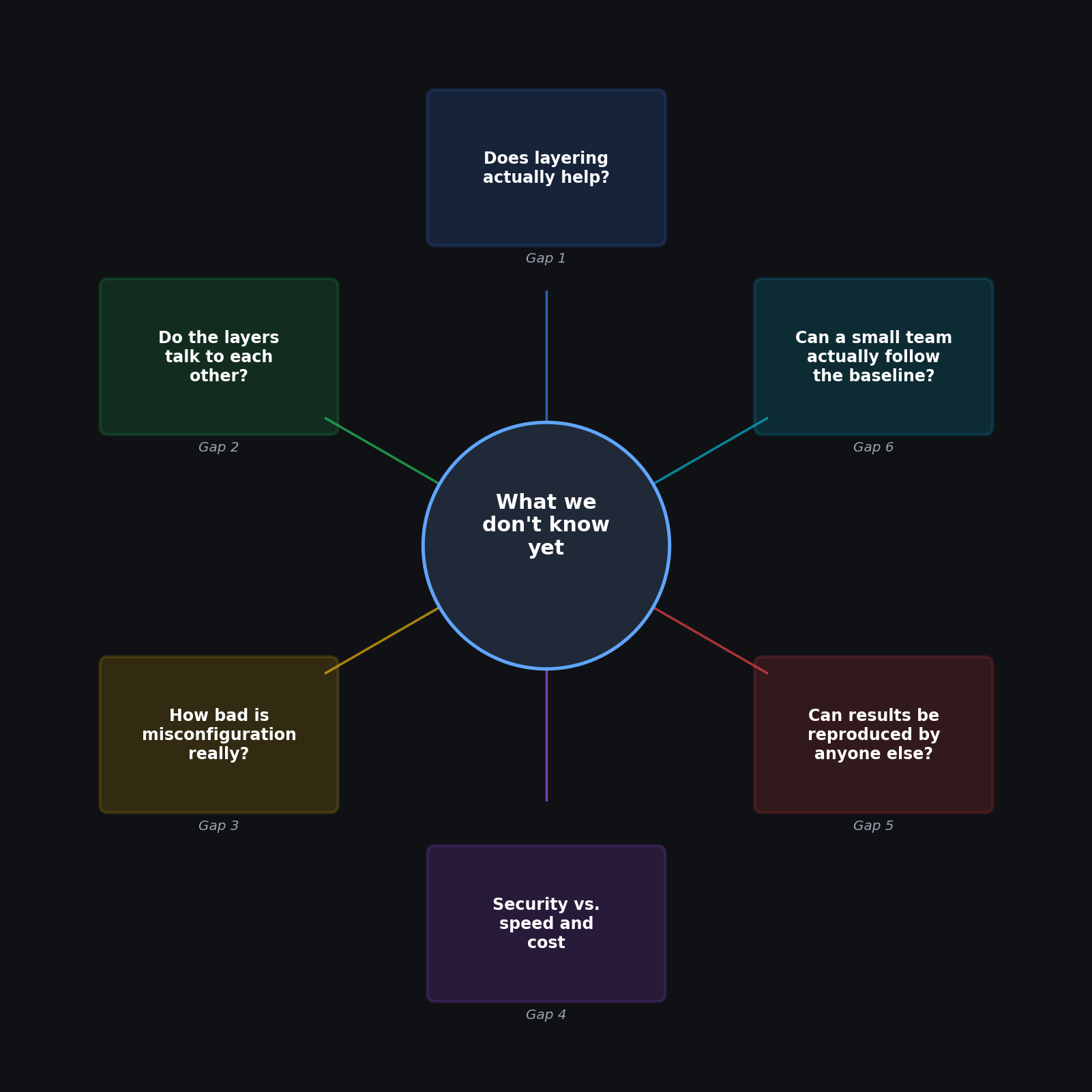
Six specific blind spots came up repeatedly across the current research literature. None of them are exotic. All of them affect ordinary production infrastructure, including the kind most small teams and startups run every day.
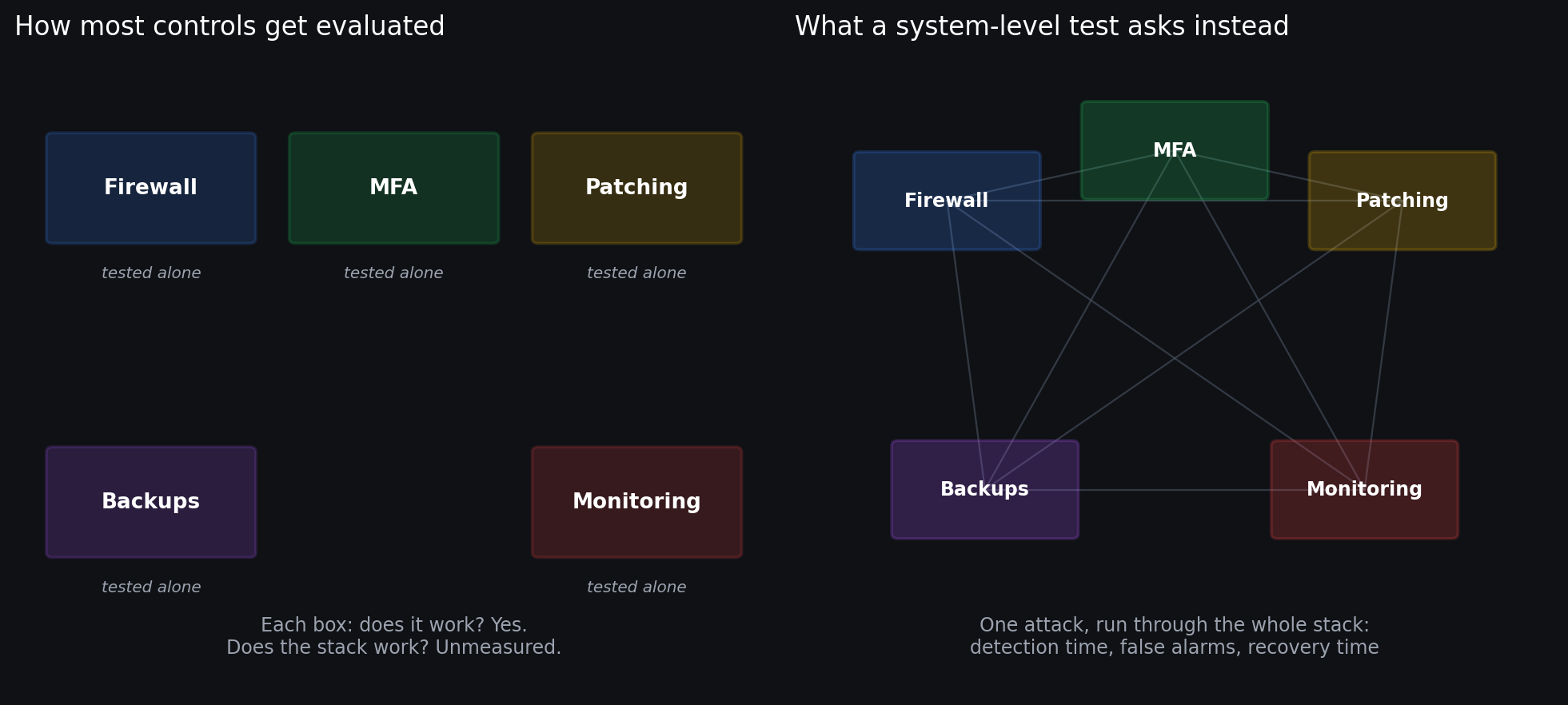
Here's each gap, explained plainly, with why it actually matters.
1. Nobody has proven that stacking controls actually helps
This is the foundational gap, and it's a strange one to still be open. The whole idea of defense-in-depth rests on the assumption that layering controls makes a system meaningfully harder to break into or recover from. That assumption is intuitive, widely repeated, and only thinly tested.
What exists instead is a lot of research acknowledging, almost as a footnote, that empirical validation is missing. Reviews of Zero Trust architecture for cloud systems admit their own findings have limited empirical validation. Broader cloud-security surveys describe the field as full of disjointed models with insufficient real-world testing of how security automation and compliance tools actually perform together.
Why this matters practically: every hardening checklist, including detailed ones like the model above, is implicitly making a bet. The bet is "more layers equals more protection, roughly proportionally." Nobody has actually measured whether that's true, where it stops being true, or which specific combinations of controls produce a benefit big enough to justify the effort of maintaining them.
What a real answer would look like: a controlled comparison: the same class of VPS, the same simulated attacks, run against different bundles of controls (say, hardened SSH configuration alone, versus that plus MFA and network restrictions, versus the full stack including monitoring and tested backups). Measure how often the attack actually succeeds, how fast it's caught, and how long recovery takes, for each bundle. Right now, that comparison essentially doesn't exist in public research.
2. The layers don't obviously talk to each other
A firewall knows about network traffic. An identity system knows about who logged in. A monitoring tool knows about processes and file changes. Each is genuinely useful on its own. What almost nobody has demonstrated is that combining their signals produces something better than the sum of the parts, or whether it just produces more noise.
Research on combining policy enforcement with behavioral detection has specifically flagged high false-positive rates and poor correlation between layers as a real, current problem, not a hypothetical one. Reviews of infrastructure-as-code security propose folding in policy checks, secrets management, drift detection, and continuous monitoring, but as a design proposal, not as something that's been measured for whether it actually catches more real incidents.
Why this matters practically: this is the difference between "we have five security tools running" and "we can actually reconstruct what happened during an incident by piecing together data from all five." The first is common. The second is much rarer, and it's the one that actually determines how fast and how completely you recover from something going wrong. It's also exactly what the Observability layer above is asking for, without a proven method for getting there.
What a real answer would look like: replaying the identical simulated attack twice, once against tools running independently and once against the same tools correlated into one pipeline, and comparing how much of the attack story can actually be reconstructed afterward, how many alerts were noise, and how long a human needed to figure out what happened.
3. Misconfiguration is a bigger, messier problem than the checklists suggest
One of the more grounded pieces of research in this space is a field study that actually went and looked at real infrastructure: 15 public and 9 private organizations, plus interviews with 31 system administrators. What it found wasn't exotic zero-days. It was default settings left unchanged, virtual machines spun up ad hoc with no consistent process, resource allocation nobody was tracking, and, repeatedly, a lack of regular auditing, often simply because the people running the infrastructure didn't have the security background to know what to check.
Why this matters practically: this lines up closely with the Lifecycle section above, and with what actually shows up in real assessments far more often than a sophisticated exploit does. The gap between "we have a hardening checklist" and "the checklist actually got followed and stays followed six months later" is where a large share of real-world risk quietly accumulates.
What a real answer would look like: this specific study identified the problem well. It didn't test the fix. A useful follow-up would take a set of small production VPS operators, apply a minimal hardening and audit routine like the one above, and then compare continuous automated checking against periodic manual review over several months, tracking how often the same misconfigurations creep back in, and how long they sit unnoticed before someone catches them.
4. Every added layer costs something, and nobody's mapped where it stops being worth it
Security controls aren't free. Restrictive network rules can add latency. Aggressive monitoring can flood a small team with false alarms until they start ignoring the alerts entirely, which defeats the point of having them. Zero Trust reviews explicitly name performance impact as a real, unresolved concern, not a solved problem. Behavioral detection research names false positives as one of its most significant open challenges.
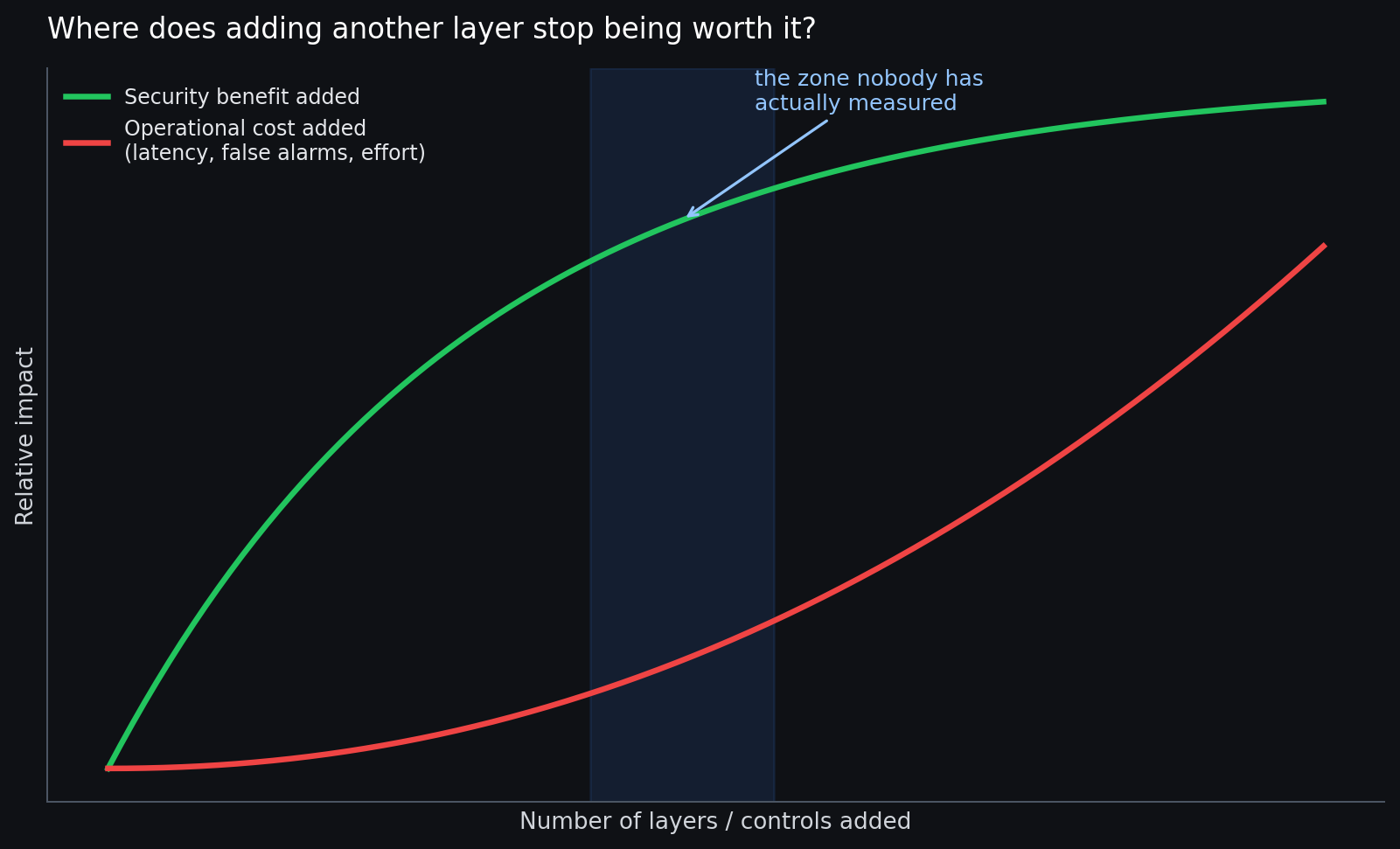
Why this matters practically: past a certain point, adding another layer of security stops meaningfully reducing risk and starts meaningfully increasing operational pain, in the form of slower requests, more noise, and more administrator time spent chasing false alarms. Where exactly that point sits is not documented anywhere in a way that's actually useful for a small production team trying to decide whether it really needs a sixth control on top of the five layers already covered.
What a real answer would look like: a direct benchmark under realistic load, measuring CPU and memory overhead, request latency, uptime, alert volume, and administrator time for each additional layer added to a baseline. The output wouldn't be a single "best" configuration; it would be a curve showing when the next control is worth adding and when it starts working against you.
5. Almost none of this is testable by anyone outside a big lab
A recurring theme across the underlying research is that results aren't reproducible. Reviews of security in software-defined networks specifically flag limited real-world validation and a lack of datasets that represent genuinely current attack patterns. Other reviews call directly for transparent, shared testbeds and evaluation methods that aren't locked inside one company's proprietary environment.
Why this matters practically: if the only place a security claim has been tested is inside one company's internal environment, using data nobody else can see, that claim is close to unfalsifiable from the outside. For an offensive security team specifically, this matters twice over: it's exactly the gap independent testing is supposed to fill, including the Verification section above, which only helps if the tools and benchmarks behind it are themselves trustworthy and repeatable.
What a real answer would look like: a shared, published benchmark that represents realistic small-infrastructure conditions: exposed SSH and web services, credential abuse attempts, privilege escalation, ransomware-style disruption, and recovery from backups. Publish the infrastructure setup, the attack scripts, the ground truth, and the evaluation method, so results can actually be checked and repeated by someone else, on a different provider, with a different size of deployment.
6. Nobody has confirmed that small teams can actually follow the good advice
This is the gap that gets skipped most often, and it's arguably the most consequential one for the majority of production VPS operators, who are not running dedicated security teams. The same field study mentioned in gap 3 links a large share of real-world misconfiguration directly to limited in-house expertise. Separately, research into how security decisions actually get made in practice finds that a lot of existing frameworks are hard to use, unclear, and built without much attention to the humans who have to operate them day to day.
Why this matters practically: a security baseline that's technically correct but operationally unrealistic doesn't produce security. It produces workarounds. A three-person team that finds a control too disruptive to their workflow will quietly disable it, and now you have less protection than a simpler baseline they'd have actually kept in place. Everything in the model above is only as good as a team's actual ability to keep running it.
What a real answer would look like: put real small teams in front of a few different approaches: a plain checklist, an automated policy-as-code baseline, and an expert-guided walkthrough, and measure which one actually gets followed correctly over time, how often people find workarounds, and how well each group performs when something actually goes wrong. This is squarely an operator-behavior question, not a technical one, and it's been almost entirely unstudied.
Why this list matters more than it looks like it should
None of these six gaps are surprising once you see them written down, which is part of why they're worth naming explicitly. Security advice, including the detailed model in Part One, tends to describe individual controls with confidence and describe the system those controls form together with a lot less certainty. That gap between component-level confidence and system-level uncertainty is exactly where real incidents tend to live.
The practical takeaway isn't "wait for someone to run these studies before doing anything." It's the opposite: since nobody has proven the ideal combination, layering, or cost curve for your specific situation, the responsible move is to actually test your own setup rather than trust that following a checklist correctly means the system it produces is sound. Run your own simulated incidents. Check whether your own layers actually correlate when something goes wrong. Time your own recovery, for real, rather than assuming it works because the backup job completed successfully last night.
That's the difference between having security controls and having tested security, and it's the gap between Part One and Part Two of this article.
This article draws on infrastructure security assessment work at RTA (Red Team Albania), an offensive security company operating across the Western Balkans, following MITRE ATT&CK, OWASP WSTG/ASVS, PTES, and NIST SP 800-115 methodology across penetration testing and red team engagements.